
Download Xion – Lightweight Audio Player, Online Radio, Custom Skins, 10-Band Equalizer
Overview
Xion is a lightweight audio player crafted to deliver high-quality sound without straining system resources. Designed for efficiency, it enables users to enjoy music playback smoothly, even on older or less powerful devices. The app addresses common pain points associated with resource-heavy media players, such as lag, high CPU usage, and memory bloat. By prioritizing performance and audio fidelity, Xion offers a reliable solution for listeners who value responsiveness and clarity.
Target users include audiophiles seeking fine-tuned sound control, casual listeners wanting a simple yet capable player, and users with limited hardware capabilities. The app is particularly well-suited for those who rely on older systems or low-end devices where performance optimization is essential. Its ability to support online radio and customizable skins adds versatility, making it more than just a basic media player.
Although the developer did not provide additional background information, Xion has been available since March 26, 2014, indicating a long-standing presence in the audio player ecosystem. Over the years, it has maintained a niche following due to its focus on minimalism, efficiency, and user customization. Real-world use cases include daily commutes, home listening, and background music during work or study sessions. Xion fills a critical gap in the mobile app landscape by offering a streamlined, high-performance audio experience without sacrificing essential features.
Key Features & Functionality
- Low Resource Consumption: Engineered for minimal system impact, Xion ensures smooth playback without overloading CPU or RAM. Ideal for older devices or systems with limited processing power.
- Online Radio Support: Access a global network of radio stations directly within the app. Users can stream live broadcasts across various genres without needing external tools.
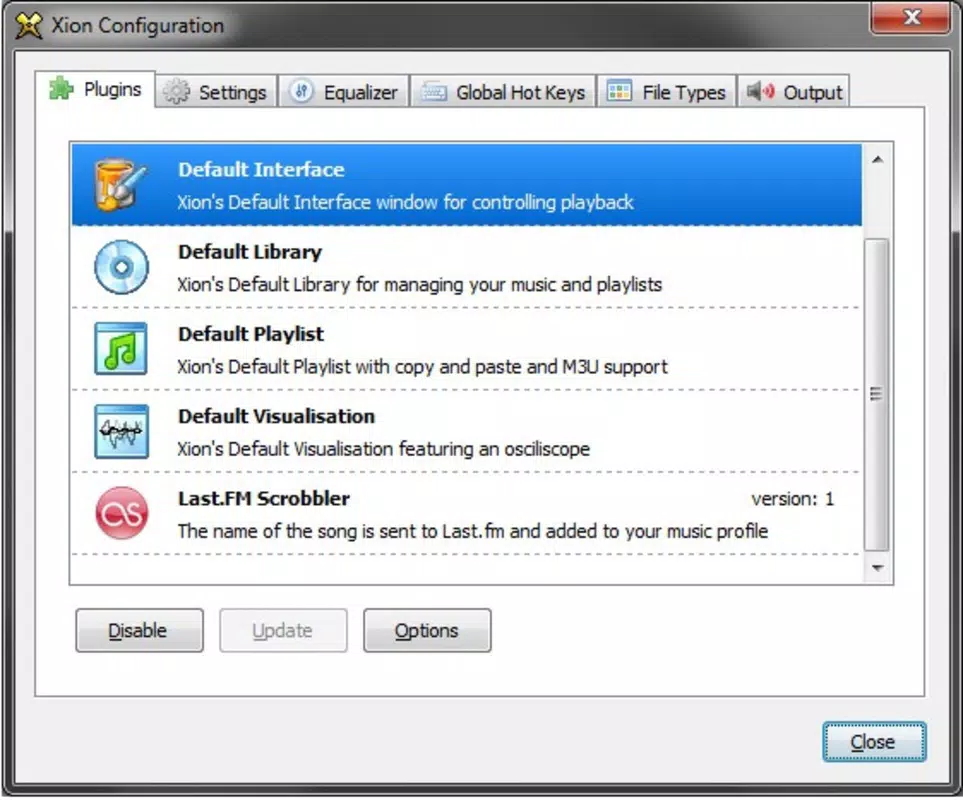
- Custom Playlists via .M3U: Import and manage playlists using the standard .M3U format, allowing for organized and personalized music sessions tailored to specific moods or activities.
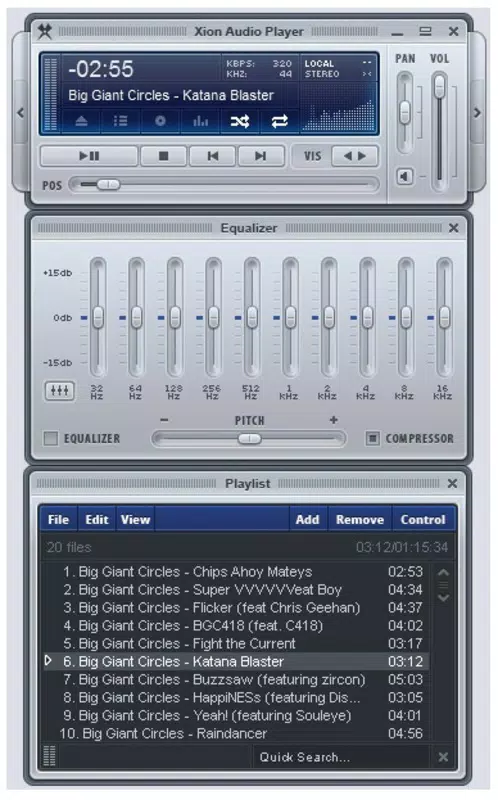
- 10-Band Equalizer: Fine-tune audio output with a detailed 10-band equalizer. Users can adjust frequency bands to enhance bass, clarity, or treble based on their preferences and speaker setups.
- Custom Skins: Download and apply visually distinct skins from the developer’s website to personalize the player’s appearance. This feature supports aesthetic customization and enhances user engagement.
For example, a user with an older laptop can run Xion without performance degradation while streaming high-bitrate tracks. A student might create a focus playlist using .M3U files and apply a dark skin to reduce visual distractions. Meanwhile, an audiophile can use the 10-band equalizer to optimize sound for headphones, ensuring balanced output across frequencies. These features work together to deliver a cohesive, user-centric experience that balances performance and personalization.
Interface, UX & Performance
The interface of Xion reflects a minimalist design philosophy, prioritizing functionality over visual clutter. The layout is clean, with essential controls—play, pause, skip, volume—easily accessible. Navigation is straightforward, relying on intuitive gestures and logical menu placement. Users can switch between tracks, access playlists, and adjust audio settings with minimal effort.
Visual style is customizable through skins, allowing users to change the look and feel of the player to match their preferences. This flexibility supports both aesthetic and usability goals, particularly for users who value a personalized interface. Responsiveness is consistent across device types, though the developer did not list formal performance metrics. However, the app’s lightweight nature suggests it operates efficiently on a wide range of hardware.
Although the developer did not list formal performance metrics, the app’s design philosophy indicates strong stability and low latency during playback. Users can expect consistent audio output without crashes or buffering under normal conditions. The player maintains smooth operation even when handling multiple playlists or high-resolution audio files. Overall, the user experience is optimized for ease of use and long-term reliability, making it suitable for extended listening sessions.
Platform Compatibility & Technical Requirements
Xion is available for desktop platforms, though specific operating system details were not provided. The app’s file size is listed as 13.5 MB, indicating a compact footprint suitable for quick installation and minimal storage usage. The software version and release date are known: version 2.0.1 was released on March 26, 2014.
Specific requirements were not listed, including minimum OS version, processor architecture, or RAM specifications. Compatibility information was not fully disclosed. The developer did not specify whether the app supports Windows, macOS, or Linux, nor whether it is available as a portable version. As such, users should verify system compatibility independently before installation.
Pros and Cons
Pros
- Minimal system resource usage ensures smooth performance on older or low-end devices.
- Support for online radio expands access to global music content without external tools.
- Customizable skins enhance visual appeal and personalization.
- 10-band equalizer provides advanced audio tuning for audiophiles.
- Efficient playlist management via .M3U format supports organized listening.
Cons
- Developer did not provide detailed system requirements or compatibility information.
- Platform availability beyond desktop was not confirmed.
- Mobile version or app store presence was not mentioned.
- Custom skins are hosted externally, requiring users to visit the developer’s website.
- App has not seen a recent update since 2014, raising concerns about long-term support.
FAQ
Is Xion available for mobile devices?
The developer did not specify mobile availability. The app is known to be designed for desktop platforms, but no information was provided about Android or iOS versions.
Can I use Xion without an internet connection?
Yes, Xion supports local music playback without requiring an internet connection. However, online radio functionality requires a stable connection.
Are the custom skins free to use?
Yes, skins are available from the developer’s website and are provided at no cost. Users can download and apply them without additional fees.
Does Xion support high-resolution audio files?
While the app’s capabilities for high-resolution audio were not specified, its lightweight design suggests it can handle various audio formats, including common high-bitrate files.
How do I update Xion?
The latest version available is 2.0.1, released in 2014. The developer has not released updates since then, so no official update mechanism is currently available.
Final Thoughts
Xion stands out as a focused, efficient audio player that delivers strong performance without compromising on key features. Its lightweight design, combined with online radio support, customizable skins, and a 10-band equalizer, makes it a compelling choice for users seeking a reliable and personalized listening experience. While the lack of recent updates and unclear compatibility details may raise concerns, the app remains functional and effective for its intended purpose.
It is particularly beneficial for users with older systems, audiophiles who value sound customization, and anyone who prefers a minimalist interface without unnecessary bloat. For those in search of a secure, lightweight, and high-quality audio tool, Xion offers a solid value proposition. Despite its age, it continues to serve a dedicated audience who appreciate its balance of performance and functionality.
Download Xion now


